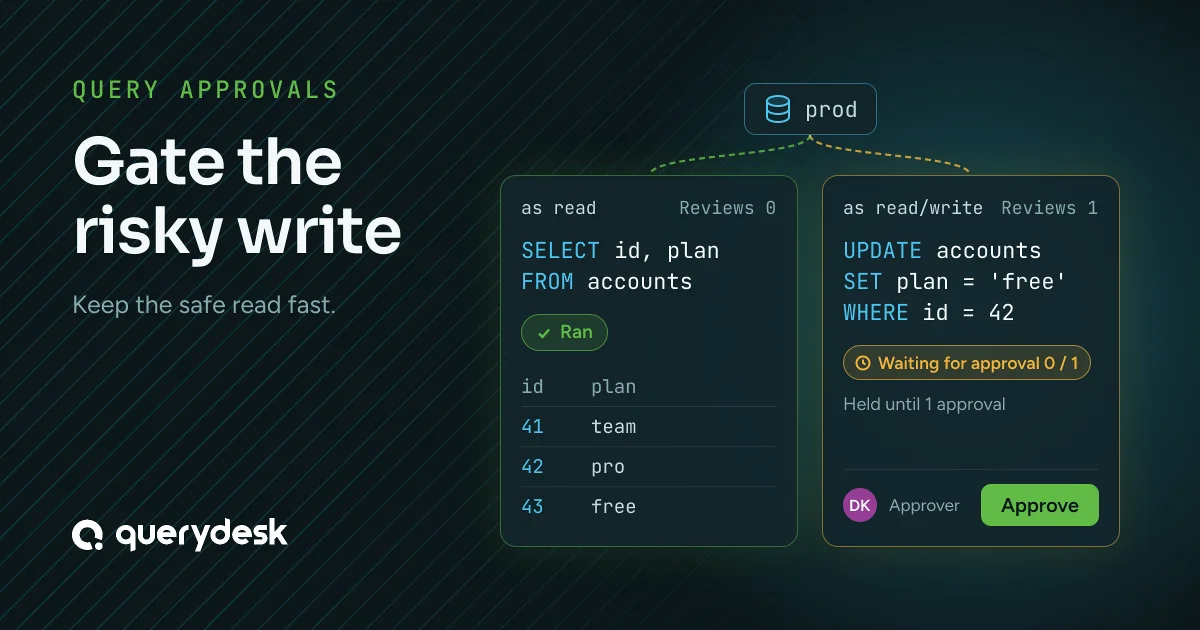
Gate the risky write. Keep the safe read fast.
QueryDesk runs a read the moment you submit it and holds a write until a teammate approves it. This post covers how that works and how to set it up, which takes about ten minutes.
Approve queries, not sessions makes the case for approving each query instead of granting a session. This post is the setup.
Reviews belong to the credential
Each database credential in QueryDesk has a Reviews setting. At 0, a query run through it executes right away. At 1 or more, QueryDesk holds the query until that many people approve it. The setting belongs to the credential you run as, so the decision doesn’t depend on parsing your SQL.
QueryDesk doesn’t label a read safe or a write risky. It checks which credential the query runs as and how many reviews that credential requires.
The two-credential setup
The standard setup is two credentials on the same database:
| Credential | Reviews | Database user | Result |
|---|---|---|---|
| Read | 0 | read-only grants | queries run right away |
| Read/write | 1 | can write | every query waits for one approval |
The read credential’s database user has read-only grants, so it can’t write, and with Reviews at 0 its queries run as soon as they’re submitted. The read/write credential’s user can write, and QueryDesk holds every query run through it for one approval.
The database user’s grants make a credential read-only, not its name in QueryDesk. When you add the read credential, grant its user read-only access and confirm it can’t write, because the whole setup depends on that.
Anyone who can run queries on a database can pick any of its credentials from the Run as selector. Credentials aren’t assigned to roles. Writes still wait, because the only credential that can write is the one that requires a review. The grants and the review count do the work, not who picks which credential.
So the rule is simple. Never give a write-capable credential Reviews 0. Anyone who can run queries on that database could pick it and write with no approval. When a write can’t wait for a reviewer, turn on Allow super admins to bypass required reviews for the database instead. A super admin can then run the query by acknowledging the override, and QueryDesk records every bypass in the audit log and posts it to Slack.
When you run a query, you pick the credential in the Run as selector. A read through the read credential returns results right away. A write through the read/write credential goes to Pending queries for review.
A read run through the read/write credential also waits for approval, because that credential requires a review. Reads run right away because they go through the read credential.
Mark the read credential as the Default credential. QueryDesk uses the default for table views, and for proxy connections when it requires no reviews, so browsing a table never waits for an approval.
Who can approve
Approving is a permission you grant per database, to a user or a role. To set it up:
-
Invite the user in Settings > Users, add a seat, and assign a license.
-
Open the database’s settings, scroll to Access, and click Add user or Add role.
-
Set their Permission to Approver.
Run queries lets someone submit and run queries. Approver lets them approve someone else’s pending query. Grant Approver to a role, and any member of it can approve, so a pending write doesn’t wait on one person.
How approvals count
Reviews is a count. At 1, any one approver clears the query. At 3, it takes three different approvers. You decide how many approvals a query needs and who can give them. When a change needs sign-off in several steps, in order, use a workflow instead.
Keep Reviews at or below the number of people who hold Approver. Above that, no query through the credential can clear.
Approving a query doesn’t run it. Once it has enough approvals, a Run query button appears for the person who submitted it. If they ticked Run automatically on approval when they submitted it, QueryDesk runs it as soon as the last approval arrives. That option is off by default.
The pending query shows its approvals against the number required, such as 1 / 2, to the submitter and to approvers.
The rules at the edges
These rules decide which approvals count, and they’re where a setup can go wrong.
What was approved is what ran
Two checks keep the approved SQL and the SQL that runs the same.
First, an approver can approve or comment, and can’t edit the SQL. The text the submitter sent is the text the approver sees and the text that runs, so the audit log shows that the approved query is the one that ran.
Second, when the submitter edits a pending query, every approval it had stops counting. An approval counts only if it came after the last edit, so nobody can collect approvals on a harmless query and then change it before running it. The earlier approvals stay on record.
You can’t approve your own query
QueryDesk doesn’t count the submitter’s approval, and the server enforces this when it counts. In the app, you don’t see an Approve button on your own query, and people without Approver see it disabled. A super admin bypass is recorded as a bypass, never as a review.
A deadlock you can configure by accident
Since your own approval doesn’t count, one setup can strand a query. It happens when Reviews equals the number of approvers and one of those approvers submits the query.
Say Dana, Sam and Lee hold Approver on a database, and the read/write credential has Reviews at 3. When Sam submits a write, only Dana and Lee can approve it. Two approvals can’t meet a requirement of three, so the query never clears.
Keep Reviews below the number of approvers, so a submitter who is also an approver still leaves enough people to clear the query.
Approve from Slack
Set a Slack channel on the database, and QueryDesk posts each query that needs review there, with the SQL, who submitted it, an Approve button and a link to review it. An approver can clear a write from their phone. QueryDesk matches them by their Slack email and counts the approval only if they hold Approver. Approvers can also comment on a pending query, which keeps the discussion on the query instead of in a side thread.
Keep approvals worth reading
When every query needs approval, approvers stop reading the SQL and click Approve. The two-credential setup prevents that. Reads go through the credential with no reviews and never reach an approver, so approvers only see writes, few enough that they read each one.
The full setup
Add two credentials to the database, a read one at Reviews 0 and a read/write one at Reviews 1, and make the read one the default. Grant Approver to a role. Set a Slack channel. Reads run right away, writes wait for an approver, and the audit log shows that what ran is what was approved.
The 14-day trial doesn’t require a credit card.